com.google.android.apps.photos
Google Photos
By Google LLC
Version 7.86.0.95604039865 MB16 downloads
Verified Android package
By Google LLC
Google Pixel Watch serves as the primary bridge between a smartphone and a compatible wearable, allowing users to manage their device settings and personal preferences from a larger screen. The application focuses on the initial setup and ongoing maintenance of the smartwatch, ensuring that the hardware remains synchronized with the user's digital life. By centralizing these controls, the software simplifies the process of tailoring the wearable experience to specific needs, from aesthetic choices to functional shortcuts.
Personalization is a core part of the experience, particularly through the management of watch faces. Users can browse different styles and adjust complications to show the information that matters most, such as battery levels or activity progress. Beyond visuals, the app handles the integration of essential services like Google Assistant for voice commands and Google Wallet for contactless payments. This setup ensures that the watch is ready for hands-free tasks and quick transactions without needing to navigate complex menus on a small wrist-based display.
The app also provides granular control over how information reaches the wearer. Users can decide which notifications are allowed to buzz their wrist, helping to minimize distractions while staying informed about important messages or alerts. Additionally, it acts as a hub for monitoring device health, including battery status and storage usage. By providing a clear overview of the watch's current state, the application helps maintain a reliable connection and ensures the wearable functions as an effective extension of the phone.
Set up and manage your Google Pixel Watch right from your Android 8.0+ device with the Google Pixel Watch app. You can easily customize your watch faces, set up Google Assistant and Google Wallet, manage notifications and more.
Here are some of the things you can do with the Google Pixel Watch app:
• Customize watchfaces
• Manage tiles
• Customize alerts and notifications
• Manage Google apps and accounts
• Install and manage apps
• Set up mobile carrier (available for selected countries and carriers only). Info at g.co/pixelwatch/networkinfo
• Manage privacy settings
For questions or support, please visit the Google Pixel Watch Community: https://goo.gle/3DT6wCg
Google Pixel Watch is only available in the following countries and regions: United States, Australia, Austria, Belgium, Canada, Czechia, Denmark, Estonia, Finland, France, Germany, Hungary, India, Ireland, Italy, Japan, Latvia, Lithuania, Malaysia, Netherlands, Norway, Poland, Portugal, Romania, Singapore, Slovakia, Slovenia, Spain, Sweden, Switzerland, Taiwan, United Kingdom.
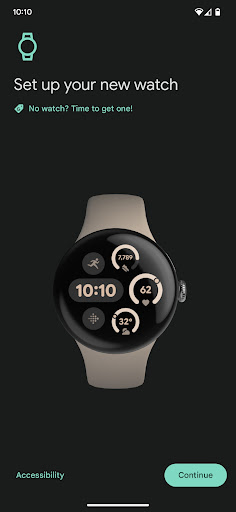
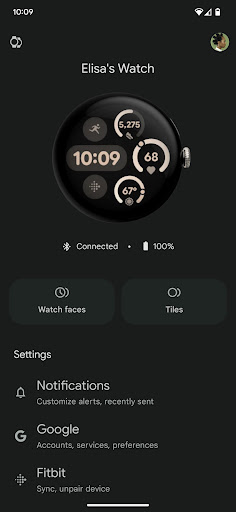
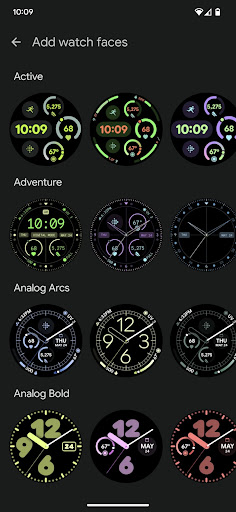
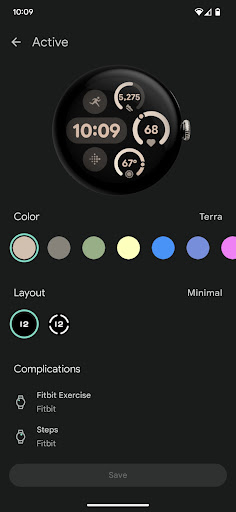
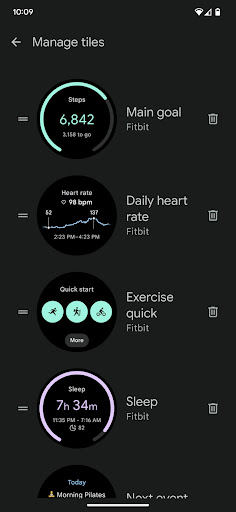
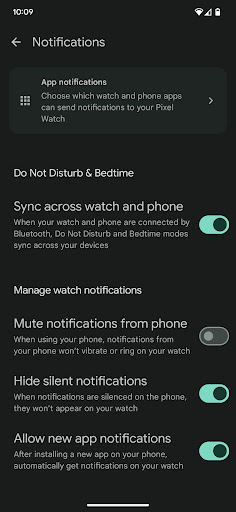
Welcome to your new Google Pixel Watch. Use the device app to set up and customize your watch settings including watch faces, tiles and notifications.
com.google.android.apps.wear.companionc00fdd0098d960f3488c4259de4decc52bd6ce88f98dbb627e507d03b6e97045Previous releases are listed for verification and reference. Only the active version is available for download.
| Version | Released | Size | SHA-256 | Downloads |
|---|---|---|---|---|
| # 4.5.0.927073594 | July 24, 2026 | 59 MB | c00fdd0098d9… | 17 |
com.google.android.apps.photos
By Google LLC

com.google.android.apps.messaging
By Google LLC